
In the previous two articles, the full details on how to construct PTKMON filters, and how to start the real-time mode, was presented.
These articles could be found here:
PKTMON – part 2: building the filters.
Part 3: Using PKTMON in a tcpdump-like mode.
In this post, a very brief summary of these articles will be available.
Step 1: Clear the current filters and apply the new.

Remove any existing filters:
pktmon filter remove
Insert the new filters. For example, assume we wish to collect DNS traffic, running on port UDP/53:
pktmon filter add -t UDP -p 53To include an IP address (or range), use the -i switch:
pktmon filter add -i 192.168.213.200 -t TCP -p 389View the current ruleset with:
pktmon filter listRemember, you cannot remove a single line from the filter list. It can only be cleared as a whole. Additionally, remember that multiple lines in the filter list is treated as “or”, meaning all packets will be evaluated against every entry.
Obviously, replace the filter details with your desired protocols and IP addresses. Full details are here.
STEP 2: Locate the interface number
Run the command:
pktmon comp list
Your system might have multiple network cards, e.g., a wireless adapter and a wired interface. Note the ID number of the adapter you wish to collect the network packets from. Use this at the end of the next command line.
STEP 3: start the collecting of packets.
Ensure to first navigate to a temporary folder, since a small log file will always be created. Do not run from the system32 folder.
pktmon start -c -m rt -s 16 --comp NUMBERIf the output states that pktmon is already running, first use: pktmon stop
When satisfied, stop the collection with CTRL+C.
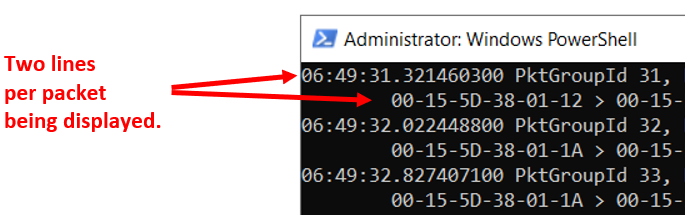
Additionally, if running PKTMON in Powershell, the “extra” line per packet can be removed by piping to the following command-let:
| Select-String -Pattern "PktGroup" -NotMatch
For example:

pktmon start -c -m rt -s 16 --comp <Interface> | Select-String -Pattern "PktGroup" -NotMatch

The pipe to the where-object will remove the extra line, including the time stamp. The output will be cleaner, but also provide slightly less details. Use when appropriate.
To capture frames and later export to Wireshark, please see the following article:
PKTMON part 5: Capture packets for offline analysis with Wireshark