
In this article we will look at the partition layout of ESXi 5. A change from earlier ESXi 4.x is that the older MBR partitioning system is replaced with a GPT style partition table. The first five partitions are mandatory and consumes exactly 900 MB together, while the last two is not technically necessary.

The first small partition is just for booting the system and locating the hypervisor image which could be on one of the next two partitions.
The actual system image is located on the first 250 MB partition, formatted with plain old FAT. The image itself, s.v00, is a 124 MB compressed file, which is decompressed on boot and contains the hypervisor operating system.
The next 250 MB FAT partition is used for inplace upgrades and is empty at start if a clean installation was done.
If the hypervisor itself should crash (“purple screen of death“) the 110 MB core dump partition is used for dumping crash information.
In this 286 MB partition we have mostly ISO files with the VMware Tools for the various supported guest operating system. We can also find the floppy images for the PVSCSI virtual disk controller, if in need to use these directly at installation on Windows Server guests.
If installing ESXi on a local hard drive and this drive is larger than about 5 GB a “scratch” partition will be created. This partition holds mostly the various log files for the vmkernel and other components. If installing on a very small drive, about 1 GB, or on USB, this scratch partition will be missing and the log files will be in RAM only. This means that in the case of power failure the log files will be lost.
A partition formatted with VMFS will be automatically created on the rest of the space of the install drive. In ESXi 5.0 the new VMFS 5 will be used with a standard block size of 1 MB no matter the size of the disk and better support for small files, e.g. VMX configuration and log files. When now using GPT (Guid Partition Table) we could also use disks with sizes over 2 TB.
If using the ESXi Shell you can access the different partitions through file system mounts. For example, the directory /bootbank is the first 250 MB partition where the actual hypervisor files are located. The /store directory is the 286 MB large repository for VMware Tools and other files.
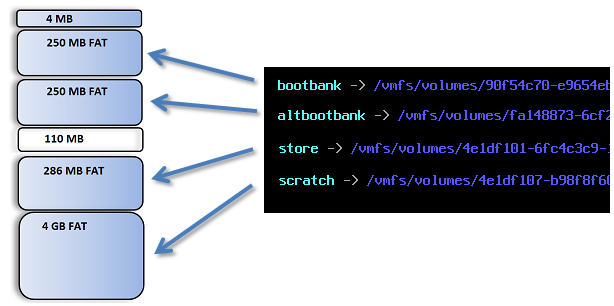
The compressed image in the first 250 MB “boot bank” partition is larger in 5.0 than in 4.1, (where the image was 70 MB), but still a very small disk foot print with about 124 MB in 5.0. If you later update the active image it will first be copied to the alternative boot bank, as a “last known good configuration”.
If the update should fail you could press SHIFT + R early in the boot sequence and select to boot the system from the alternative boot bank.
As I understand root partition (where found /etc, /lib and other folders) is a result of uncompressed files on first 250 MB partition and root partition located in system memory?
Then where locate configuration files of ESXi ? (because after reboot, as I understand root partition recreated and some configuration files cleaned from changes )
Thank you for your comment Evgeniy. It is correct that the root partition (inside ESXi while running) is a result of files being uncompressed at start and only exist in RAM during runtime.
The actual configuration (mostly /etc with sub directories) are stored in a file called state.tgz where all local configuration is saved and are not cleaned after reboot as long as you have some persistent storage, i.e. not using Auto Deploy.
This means that a given NFS store cannot support multiple VM.
William, I am unsure of your comment – the blog post is on the local partitions for the installation of ESXi which can not be on NFS – and of course does NFS datastores support multiple VMs.
Is not posible limit the size of default datastore? I’m installing ESXi 5 in an laptop for testing and the installer get all free space on disk for create the datastore. I only need a 100GB datastore and I want use the other 200GB available for other OS…
I don’t need a 300GB datastore, but if I delete de default datastore is imposible recreate again.
What is the default host swap partition size?
Thanks for your comment. It is zero MB, since ESXi does not have a swap partition at all. If swapping has to be done it will be against the VMs vswp files located in their datastores, typically on SAN storage.
On Classic ESX the swap partition had to be configured during install, but we do not have to worry about this on ESXi.
Thanks Rickard.
your blog is very useful to me.
http://itmechanic.wordpress.com/category/urls/
How do you remove GPT partitions in the esxi 5 system , and what are the commands?
Hello Brenard,
which GPT partitions would you like to remove and for what reason?
I’m not familair with the Esxi 5 system, what I’m trying to do is make the partitions unprotected so I can install a Windows application the computer. And right now, when I try to do the install , it tells me that the partition are GPT protected so I’m attempting to go into the Esxi operating system and try to make them unprotected so that I can do the new install
So you have a computer that used to have an ESXi installation, but you do not wish to continue to use ESXi, is that correct?
The Windows application that you mention, it should not be running inside a virtual machine on the ESXi host?
If you would like to erase ESXi and install Windows you should be able to delete the old partitions from the Windows Installer. There is no way from inside ESXi to erase the partitions it is using actively.
I’m installing esxi 5.5 on a 64 Gb SD card. I found in another post that the VMFS datastore is not created when installing on flash media. Why is that? I want to install a small utility VM on a given host and I have no other disks in the host other than the SD card and so I would like to use the rest of the SD card for a VMFS data store. It doesn’t show up as free space in the vSphere client. Is what I’m trying to do possible and why would it not allow me to create a VMFS data store on the SD card?
The reason for not allowing anything on the SD flash card are that intensive writes *could* break it and by that crash the ESXi host.
Can you please clarify why FAT (why not ntfs) file system is used in ESXI while the kernel is similar to Linux.
The reason for using the old FAT file system is that it is very simple to write a file system driver that could early in the boot process read and access the files stored on the boot bank. After decompressing and loading the files into RAM the FAT is not really in use, so there is no security issue with using it on the boot bank partitions.
Regards, Rickard
What I’m trying to do is use a single 1TB HD for both ESXi 5.0 and the datastore, by putting ESXI in the first partition(s) which are a maximum of 100gb, leaving a second partition of about 870gb for the datastore.
When I run the install, however, it insists on repartitioning the entire HD and consuming all of it for ESXi. That seems very inefficient since ESXI doesn’t need nearly that much space. Is there a way to partition the HD in advance (using GPART, for instance) so that ESXi will install in a smaller partitioned space and leave the remainder alone?
Hello,
you should not have to do any partition creation in advance (and likely can not either). The installation will create the partition it will need and all the remaining will be a VMFS datastore for you to store your local VMs in. Do you not see this datastore after installation?
Regards, Rickard
V. Useful background info on ESXI partitions. What would happen if I ‘lost’ /altbootbank partition (i.e. reformatted it)? I’ve got some hosts with bad file descriptors (state.NNNNN) which I cannot remove and seem to be causing issues with VUM patching operations. Once host is patched, presumably current /bootbank would become /altbootbank?
Is it possible to plug USB to host esxi and copy 6gb ISo from host to datastore.
Hi Folk,
Would you suggest me about min configuration to install VMware workstation on lap or desktop along with create openfiler SAN box
Thanks in advance
Can you do for 6.x versions of ESXi as well please ?