
The Microsoft hotfix MS16-072 (KB 3159398) released June 14 2016 will break fundamental parts of traditional Group Policy processing. After the hotfix is installed on a client computer no Group Policy objects that use security filtering to user groups will no longer be applied.
This is done on purpose by Microsoft through a design change delivered in a Windows Update security fix that silently changes the way GPO must be configured to work. All Group Policy Objects configured in the way Microsoft has recommended the last 16 years will stop to work.
Group Policy Objects with default permissions will work. GPO that only applies to computers will work. GPO with security filtering to user groups will typically not work after the update.
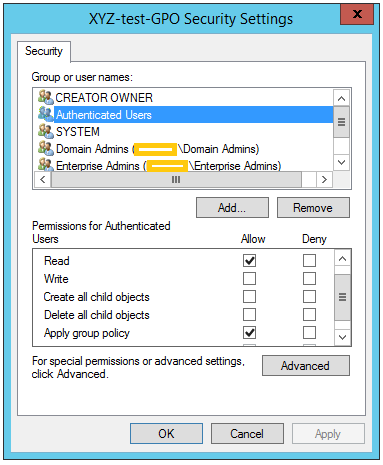
A quick review of how Group Policy security filtering works. If a Group Policy Object should be applied to an end user this user must have two specific allow permissions: READ and APPLY GROUP POLICY.
By default a new GPO has a number of permissions with different access levels, but only one entry has both “read” and “apply group policy”: the special group “Authenticated Users“.
Despite the name “Authenticated Users” actually includes both logged on users but also computer objects from either the same domain or a trusted domain.
This means that a default GPO will be applied to all users and computers located in some OU to which the GPO are linked somewhere above.
To filter a GPO to only hit a certain amount of users and not everyone in the linked OU tree the Microsoft recommendation has always been to remove the Authenticated Users group and add the user group and make sure they have READ and APPLY GROUP POLICY.
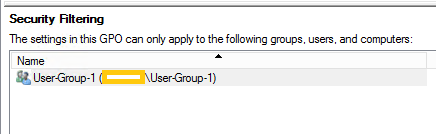
If using the “Security Filtering” option in Group Policy Management Console these two permissions were given automatically by just selecting the group.
After the MS16-072 / KB3159398 update this will no longer work for any user filtered GPO. A change is made to the client computer in the way the Group Policy are processed and the computer account must now also have READ permission to the Group Policy Object. Note that the user group must still have the Read and Apply GP as before.
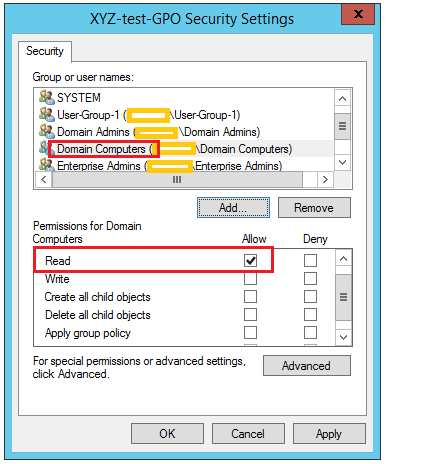
To fix this issue either uninstall the MS16-072 or add a read permission for Domain Computers on each and every GPO that use security filtering to user groups.
Note that only read should be given. Do not use the Security Filtering option on the Scope tab since this will also set the Apply GP permission.
Make sure the old user group is still on the Access Control List, it should not be changed.
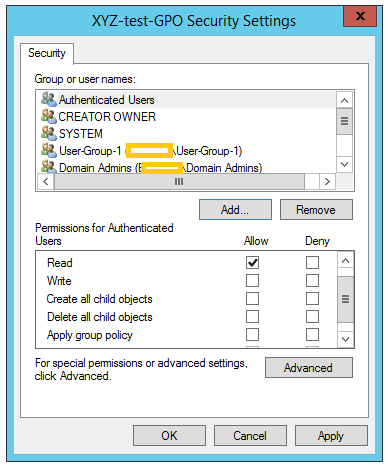
Note that this workaround is only needed if the Authenticated Users group was removed when configuring the GPO. If the group are still present with READ but not APPLY GROUP POLICY there will not be any issue. This is due to computers being included in the Authenticated Users group and through this has the necessary permissions.
Note also that the delegation tab does not give all information. The best option is to use Delegation tab / Advanced to view the true ACL.
Customers installing the MS06-072 update without changing all GPO in advance will unfortunately suffer mayor production impact. It goes without saying that this kind of design changes by Microsoft should not be handled in such way.
Thanks so much for writing this article. I have spent many hours across many days trying to figure out what changed in our environment.
Thank you, my friend! Thank you!
THANK YOU !!!
Wow this is hideous.
Thank you for sharing!
Oh man, FU microsoft.
We spent all day on this, and had narrowed it down to the any GPO with security filtering now being blocked. Cheers for confirming we hadn’t gone completely mad!
Adding domain computers ‘read’ permission to the relevent GPOs fixed the problem. Interestingly enough, this appears to have been a requirement for ‘merge’ loopback processing since Vista, i.e. the computer account needs a minimum of READ permission, but not for ‘replace’ loopback processing.
Now it needs it for both with this update. Such a great change to rollout silently as part of a ‘security’ fix. Not.
Thank you! We spent some days trying to solve this problem! Thank you!
OMG i spent a few days on this. Thanks!
Thanks so much for this!
Tore my hair out all yesterday trying to work out what had suddenly broke one of our GPOs.
Great find and nice simple guide to fix
Thank you, thank you, thank you…
Thanks for this – was wondering what the hell was going on!
Thank you!
Sooo many thanks!! Have spent hours of figure out what changed in our environment!!!!
Thank you sooo much!!
I spent a lot of time to figure out what changed…
You are awesome. We were scratching our heads for three days before we stumbled upon your article. Very well diagnosed and written.
Thanks so much, this was driving us insane
Thank you!
Thanks a million for this! I spent a sorry amount of time trying to figure out why group policy wouldn’t deploy on my domain. Disappointed I didn’t find this sooner.
Thank you!!!
Thanks.
I just spent 4 hours troubleshooting on this and thought it was a either an AD issue or something related to Windows 8 and 10.
Because the funny thing is that it works fine on Windows 7.
We have Authenticated Users with both Read and Apply Group Policy settings and do NOT use Security Filterng, however we have found that the only solution is to still add Domain Computers with READ access for our GP’s to work. Anyone else experience the same? If so, did you just add it and move on, or did you find the reason why its still needed and correct it?
Hello Mr Ed,
it is quite strange what you describe. This is since that all domain joined computers are automatically included in the special group Authenticated Users, so if the AU group really has Read and Apply Group Policy it SHOULD work. 🙂
Regards, Rickard
I still cannot get this to work. I did find the offending MS update and have uninstalled it. When that didn’t work, I added the Domain Computers to the Delegation with Read rights. There is no “READ but not APPLY GROUP POLICY” toggle–most likely because I am using a Windows 2003 SBS to run my GPO’s. I did not see it noted in this article, but I am guessing that this applies to more current versions of Windows Server.
I would really appreciate any suggestions. Thanks.